
From many to one
Aggregating values in parallel on the GPU


In the last post we used GPUs to add two vectors, element by element. It’s what we call an embarrassingly parallel problem, but you might be thinking: is this all that GPUs are suited for? Doing independent things in parallel with no coordination?
One operation often arising in LLM inference is summing all elements of a vector. On a CPU, you would do this:
  float sum(std::vector<float> &values) {
  float acc = 0.0;
  for (size_t idx = 0; idx < values.size(); ++idx) {
    acc += values[idx];
  }
  return acc;
}
How would you parallelize this? Each value is added to a common accumulator. If you’ve been around the block for a while, you’ll recognize this as a fertile ground for a classic race condition, also known as a lost update problem.
If we were to naively spawn a bunch of workers and process elements independently, at some point two workers would both read the current value of acc at the exact same time, add their respective values onto it, and the last one to write would win the race—the other would lose its update.
To solve this in CPU-land, you’d need some sort of coordination primitive like a lock: while one worker performs its read-then-update, others need to wait their turn. This contention kills performance.
But there is another way: each worker can take ownership of a section of the work to do, complete it in private, and then we can aggregate the partial results later. This is called privatization.
Summing vectors on the GPU
In practice, we want to sum batches of vectors independently, say a batch of 65536 vectors, each of length 2048. The result will be 65536 independent sums. This should be a beefy enough workload to saturate the GPU's resources and keep us warm for a bit.
There are many ways to organize this work, but we’ll keep it simple by creating as many thread blocks as vectors we need to reduce. This way, each thread block is responsible for one vector, and will write a single number as a result.
The most naive approach: atomicAdd
Technically, the easiest way to do this is have each thread read a value from global memory and add it to the output with an atomic write. But that is a terrible option! The GPU will serialize all writes to the same value, so we might as well be using CPUs and locks.
We need a more parallel-friendly approach.
Hierarchical reduction
The plan is to do log(N) iterations where each thread does one addition. At the end, the first thread contains the sum of the entire N values. Beautiful, no? We only need N/2 threads.
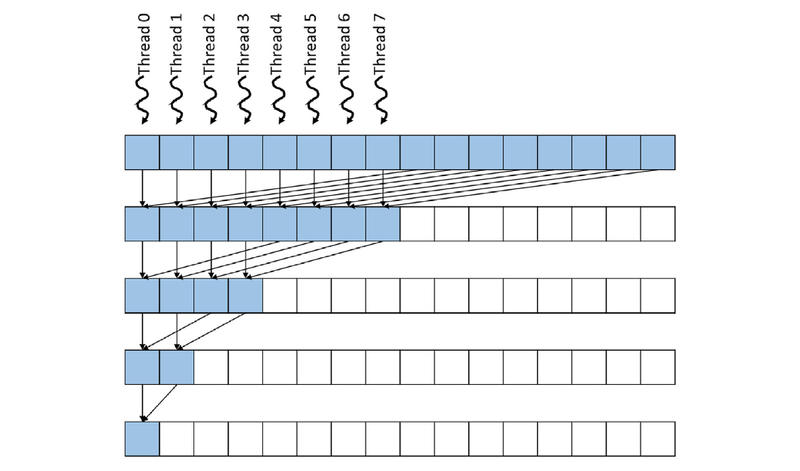
You'll notice in this picture, though, that after the first step, when each of the 8 threads contains a partial sum, thread 0 needs to add itself to the value at thread 4.
How can a thread get the value from another thread? Turns out, thread blocks have access to a shared pool of memory that only threads within that block can read and write to. It is known as shared memory or L1 cache, and it’s entirely programmer-managed! It is also ten times lower latency than going to global memory.
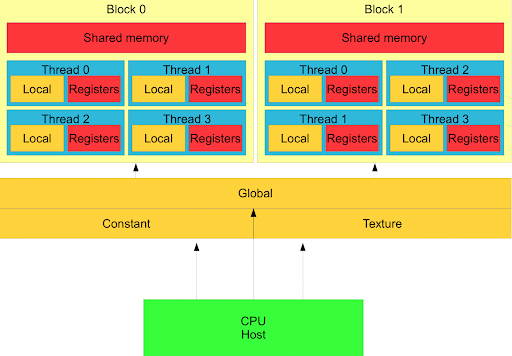
This memory hierarchy is a powerful tool—memory closer to the computing core is orders of magnitude faster and smaller than the next one further away. With careful planning, we can both perform fancy coordination while avoiding contention and unnecessary roundtrips.
So our plan is:
Choose the number of threads per block, for example,
blockThreads = 512.Accumulate chunks of
blockThreadsvalues from global memory into shared memoryPerform reduction hierarchically in fast shared memory
Write sum back to global memory
Let's give it a go!
const int blockThreads = 512;

__global__ void sum_kernel(float* out, float* input, size_t vector_len) {
  // we need to declare shared memory explicitly,
  // as it's programmer-managed
  __shared__ float shmem[blockThreads];

  size_t vector_idx = blockIdx.x; // which vector are we summing?
  size_t tid = threadIdx.x; // which thread in the block are we?

  // offset to find the vector we need to work on
  size_t vector_start = vector_idx * vector_len;

  shmem[tid] = 0.0;
  __syncthreads();

  // reduce with a grid stride loop to handle reduce_size > blockThreads
  for (size_t idx = tid; idx < vector_len; idx += blockThreads) {
    shmem[tid] += input[vector_start + idx];
    __syncthreads();
  }

  // reduce in log N steps, accumulating onto shared memory
  for (int stride = blockDim.x / 2; stride >= 1; stride /= 2) {
    if (tid < stride) { shmem[tid] += shmem[tid + stride]; }
    __syncthreads();
  }

  // the first thread in each block writes the final sum
  if (tid == 0) {
    out[vector_idx] = shmem[0];
  }
}
  Benchmark               Time        FLOPs/s
--------------------------------------------------
SumFp32/65536/2048      0.454 ms    295.582 GFLOPs/s
Not too bad. But to progress from here, it’s time to let you in on a little secret.
The Hidden Code
There is a hidden code CUDA programmers live by, a set of commandments. They encode arcane knowledge about living in harmony with the physical hardware that actually runs the code, instead of blindly trusting the leaky abstraction that is the CUDA programming model.
Those who ignore the commandments are doomed to Slow Limbo, where kernels take forever to run while GPU compute sits idle.
Those who follow them, some claim, will see their FLOPs/second go up.
#1: You Shall Coalesce Memory Accesses
This is one of the most important principles.
The CUDA code we write runs on compute cores in an SM (Streaming Multiprocessor), physically far from global memory (VRAM).
When a thread reads or writes memory, the SM groups those operations to better utilize the memory bus. It can only do this if they are coalesced.
If you look at our kernel, we respect this principle in the first reduction stage:
    for (size_t idx = tid; idx < vector_len; idx += blockThreads) {
    shmem[tid] += input[vector_start + idx];
    __syncthreads();
  }
Thread 0 (
tid == 0) adds offsets 0 and blockThreads in a vector.Thread 1 (
tid == 1) adds offset 1 and offset blockThreads + 1 in a vector.Etc. This causes one coalesced read per loop iteration.
In the log(blockThreads) hierarchical reduction:
    for (int stride = blockDim.x / 2; stride >= 1; stride /= 2) {
    if (tid < stride) { shmem[tid] += shmem[tid + stride]; }
    __syncthreads();
  }
Even though at each loop iteration we halve the number of working threads by 2, accesses to and from shared memory remain coalesced.
So we are doing okay on this front. What else can we learn from the hidden code?
#2: Not All Memory is Created Equal
SMs physically have an L1 and L2 cache inside (the smaller number means it is closer to the compute). We are using shared memory heavily, with typical latencies around 30-40 cycles, 10x faster than global memory. So far so good.
But there is an even faster memory we almost never think of as such: registers!
Each thread has a very small number of allocated registers that are fast; their latency is 1 cycle. That is 30x-40x faster than accessing shared memory.
As the proverb goes:
Don’t go back and forth to global memory if you can do it in shared memory, and
Don’t go back and forth to shared memory if you can do it in registers.
In particular, the first strided accumulation we could do from global memory to registers entirely! Then, do a single write to shared memory:
    // first accumulation in registers
  float thread_sum = 0.0;
  for (size_t idx = tid; idx < vector_len; idx += blockThreads) {
    thread_sum += input[vector_start + idx];
  }

  shmem[tid] = thread_sum; // single write to shared memory
  __syncthreads();
  Benchmark               Time        FLOPs/s
--------------------------------------------------
SumFp32/65536/2048      0.415 ms    323.534 GFLOPs/s
A 10% speedup! The elders are onto something.
But surely we can do more. There is a technique called warp reduction that we might be able to use. What is a warp, you say? Ah, I forgot to tell you:
#3. Threads Aren’t Real
Well, they sort of are, but it makes no sense to think of them as truly independent. An SM, like any computing device, has a scheduler. When you launch a grid, you assign a backlog of thread blocks to work on, and the SM decides what to launch when—and since it is quite smart, it likes having a large backlog of things it can multitask on.
But the SM scheduler cannot schedule work onto individual threads. Instead, it schedules work onto warps: groups of 32 threads, in a SIMT fashion (single instruction, multiple threads). All threads in a warp execute in lockstep, and there is no way to avoid that.
In fact, if you add a conditional like if (tid == 0), you’ll still take up an entire warp to run, but only the first thread will do anything. The other 31 threads will stall and wait. If there was an else branch, the scheduler now has to issue 2 instructions in sequence: one for the first thread, and one for the other threads in the warp.
Warp reductions
So what are warp reductions? They are a technique that benefits from special coordination operations that threads in a warp can do, in a single cycle, without locks, shared memory, or anything else. For example, we can do a hierarchical reduction entirely in a warp!
    for (int offset = 16; offset > 0; offset >>= 1) {
    val += __shfl_down_sync(0xffffffff, val, offset);
  }
__shfl_down_sync takes what is in the thread offset to the right of us and puts it into our val register. We can use that to reduce 32 values onto 1, and each of the log(32) steps takes 1 cycle to move things around. Awesome!
Putting it all together
Let’s implement our fancy new warp reduction in our kernel. To do that, we’ll cut the shared memory reduction short until we have a warpful of values (32 values). Then, we’ll reduce those with a fast warp reduction.
  __global__ void sum_kernel(float* out, float* input, size_t vector_len) {
  // we need to declare shared memory explicitly,
  // as it's programmer-managed
  __shared__ float shmem[blockThreads];

  size_t vector_idx = blockIdx.x; // which vector are we summing?
  size_t tid = threadIdx.x; // which thread in the block are we?

  // offset to find the vector we need to work on
  size_t vector_start = vector_idx * vector_len;

  // first accumulation in registers
  float thread_sum = 0.0;
  // reduce with a grid stride loop to handle reduce_size > blockThreads
  for (size_t idx = tid; idx < vector_len; idx += blockThreads) {
    thread_sum += input[vector_start + idx];
  }

  shmem[tid] = thread_sum; // single writes to shared memory
  __syncthreads();

  // reduce in log N steps, accumulating onto shared memory
  // stop when we have 32 values
  for (int stride = blockDim.x / 2; stride > 32; stride /= 2) {
    if (tid < stride) { shmem[tid] += shmem[tid + stride]; }
    __syncthreads();
  }

  // warp shuffle for the final warp-level reduction
  if (tid < 32) {
    float val = shmem[tid]; // load from shared memory
    for (int offset = 16; offset >= 1; offset /= 2) {
      // accumulate "down"
      val += __shfl_down_sync(0xffffffff, val, offset);
    }

    if (tid == 0) {
      out[vector_idx] = val;
    }
  }
}
  Benchmark               Time        FLOPs/s
--------------------------------------------------
SumFp32/65536/2048      0.414 ms    323.872 GFLOPs/s
What? 1 microsecond faster. After all, didn’t we save 5 calls to __syncthreads (the final iterations, 32 down to 1)? I’m going to complain at the CUDA Elders Council.
I'm back. They told me to re-read the third commandment and atone for being such a silly goose.
Since threads aren’t real, __syncthreads is actually a barrier different warps arrive at, not threads. The final iterations we saved happened within a warp anyway! So putting such a barrier when only one warp is active is a no-op.
Time and again, truly thinking about the hardware from first principles helps anticipate which optimizations are likely to have an effect.
The commandments are useful guides, but grounding them in empirical data from actual hardware is always mandatory.

Comments
No comments yet. Be the first to comment!